


If you own a small business, you’ve probably been told that you need SEO. Your website needs to rank on Google. You need more organic traffic. But nobody ever explains how to actually do SEO when you’re running a business with limited time, limited budget, and zero marketing staff.
This small business SEO guide for 2026 changes that. By the time you finish reading, you’ll understand exactly what SEO means for your business, which tasks actually move the needle, and how to implement everything step by step—even if you’ve never touched a website before. And if you’re ready to use AI to speed things up, we’ve also reviewed the best AI SEO tools for small businesses that can handle much of this work for you.
Let’s start with the most important thing: SEO in 2026 is not about tricks, hacks, or gaming the algorithm. Google’s AI-powered search now understands content almost like a human does. That means the old shortcuts don’t work anymore—and that’s actually great news for small businesses that focus on genuinely helping their customers.
Table of Contents
- What Is SEO for Small Businesses in 2026?
- How Google Search Works (Simple Version)
- The 5 Pillars of Small Business SEO
- Step 1: Set Up Your SEO Foundation (Free Tools)
- Step 2: Keyword Research for Small Businesses
- Step 3: On-Page SEO Checklist
- Step 4: Content Strategy That Actually Works
- Step 5: Local SEO Essentials
- Step 6: Measuring SEO Success
- DIY vs. Hiring Help: A Decision Framework
- How AI SEO Tools Help Small Businesses
- Common Small Business SEO Mistakes to Avoid
- Your 30-Day SEO Action Plan
What Is SEO for Small Businesses in 2026?
SEO stands for Search Engine Optimization. For a small business, SEO simply means making your website show up when potential customers search Google for what you sell or do. When someone types “emergency plumber near me” or “best coffee shop in Austin,” the businesses that appear at the top of Google’s results are the ones that have done SEO well.
In 2026, small business SEO has changed in three important ways:
First, AI Overviews now appear at the top of many search results. Google’s AI generates a summary answer before showing any website links. If your content is clear, well-structured, and genuinely helpful, Google may pull information from your site into these AI Overviews—giving you visibility even if you don’t rank number one.
Second, Google cares more about expertise than ever before. The search engine evaluates whether your business demonstrates real experience in your field. A plumber’s website written by an actual plumber will outrank a generic article written by someone who’s never fixed a pipe. This is great news for small businesses with genuine expertise.
Third, AI tools have made SEO accessible to everyone. Tasks that used to require expensive agencies—keyword research, content optimization, technical audits—can now be handled by affordable AI SEO tools. Our guide to the best AI SEO tools for small businesses covers the top options for every budget. But tools alone aren’t enough. You still need to understand the fundamentals, which is exactly what this guide provides.
How Google Search Works (Simple Version)
You don’t need to be a technical expert, but understanding the basics helps everything else make sense. Here’s how Google works in three simple steps:
Step 1: Crawling. Google sends out automated programs called “crawlers” that browse the internet, moving from link to link, discovering web pages. Think of them as Google’s scouts, constantly mapping what exists on the web.
Step 2: Indexing. When a crawler finds your page, Google analyzes its content—text, images, structure—and stores this information in a massive database called the index. If your page isn’t in Google’s index, it cannot appear in search results.
Step 3: Ranking. When someone searches, Google’s algorithm scans its index and decides which pages best answer the query. It evaluates hundreds of factors: Is the content relevant? Is the website trustworthy? Does the page load quickly? Is the information accurate and current?
Your job with SEO is to make sure Google can crawl and index your site easily, and that your content is the best answer to the questions your customers are asking.
For a deeper understanding of how AI fits into this process, read our comparison of AI SEO versus manual SEO for small businesses—it explains which tasks AI handles best and where human judgment still matters most.
The 5 Pillars of Small Business SEO
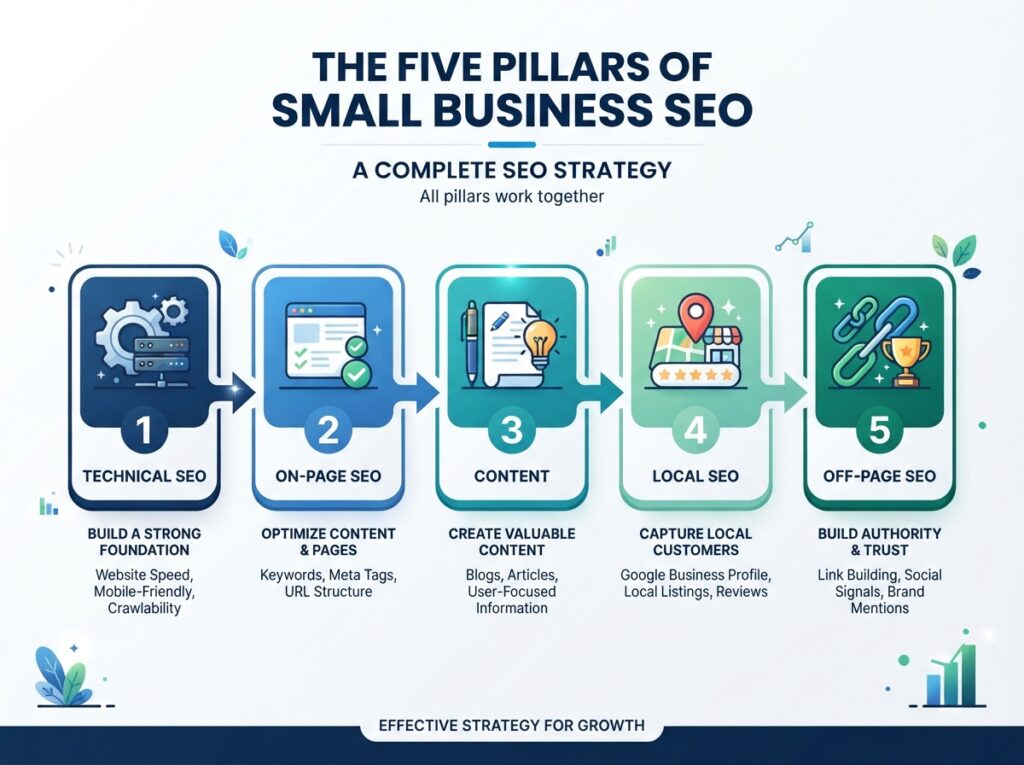
Everything you need to do for small business SEO falls into five categories. Master these five pillars and you’ll have a solid foundation:
Pillar 1: Technical SEO
This is your website’s foundation. It includes making sure Google can find and crawl your site, your pages load quickly (under 3 seconds), your site works perfectly on mobile phones, you have an SSL certificate (the padlock icon in browsers), and your site structure makes sense to both visitors and search engines. Think of technical SEO as the plumbing and electrical work—not glamorous, but nothing else works without it.
Pillar 2: On-Page SEO
This is about optimizing each individual page on your website. It includes writing clear, descriptive title tags that include your target keywords, crafting meta descriptions that make people want to click, using proper heading structure (H1, H2, H3) to organize content logically, including keywords naturally in your content, and optimizing images with descriptive file names and alt text. On-page SEO tells Google exactly what each page is about.
Pillar 3: Content
Content is what actually ranks in search results. For small businesses, content means your service pages, product descriptions, blog posts, FAQs, and any other text on your site. Good content answers customer questions thoroughly, demonstrates your expertise and experience, is original (not copied from other sites or generated by AI without human review), gets updated regularly, and includes the specific details customers need to make decisions. Content is where most small businesses should spend 60% or more of their SEO time.
Pillar 4: Local SEO
If you serve customers in a specific geographic area, local SEO is essential. It includes optimizing your Google Business Profile (the information that appears when someone searches your business name), building consistent citations (mentions of your business name, address, and phone number across the web), and getting genuine customer reviews. Local SEO helps you appear in the “local pack”—the map and three business listings that appear for location-based searches.
Pillar 5: Off-Page SEO
This is about building your website’s authority through links from other reputable websites. When other sites link to yours, Google treats those links as votes of confidence. For small businesses, off-page SEO means getting listed in relevant directories, earning mentions from local news sites, partnering with complementary businesses for cross-promotion, and creating content that other sites naturally want to reference. Quality matters far more than quantity—one link from a respected local news site is worth more than a hundred random directory links.
Step 1: Set Up Your SEO Foundation (Free Tools)
Before spending a single dollar on SEO tools, set up these four completely free resources. Every small business needs them, and they take less than an hour total.
Google Search Console
This is the most important free SEO tool in existence. Google Search Console shows you exactly which search queries bring people to your site, how many people click through, which pages Google has indexed, and any technical problems Google finds on your site. To set it up, go to Google Search Console, add your website as a property, and verify ownership (usually by adding a small code snippet to your site or through your domain provider). Once connected, submit your sitemap so Google knows about all your pages.
Google Analytics 4
While Search Console shows what happens on Google, Google Analytics shows what happens on your website. You’ll see how many visitors arrive, which pages they view, how long they stay, and—crucially—whether they take actions like filling out a contact form or making a purchase. Set up at Google Analytics and add the tracking code to your website.
Google Business Profile
If you have a physical location or serve a local area, claim your Google Business Profile immediately. This is what appears when someone searches your business name or finds you in Google Maps. Fill out every section completely: business name, address, phone number, website, hours, services, photos. Businesses with complete profiles get significantly more clicks and calls from local searches. For a complete local strategy, see our local SEO guide for small businesses.
Bing Webmaster Tools
Google dominates search, but Bing still handles about 8-10% of US searches. Set up Bing Webmaster Tools—it takes 10 minutes and gives you additional data. You can even import your site information directly from Google Search Console to save time.
Foundation Setup Checklist
- Google Search Console installed and verified
- XML sitemap submitted to Google
- Google Analytics 4 installed
- Google Business Profile claimed and fully completed
- Bing Webmaster Tools set up
- SSL certificate active (your site shows https:// not http://)
Step 2: Keyword Research for Small Businesses
Keyword research means finding the exact words and phrases your potential customers type into Google. This step tells you what content to create and which pages to optimize. Small business keyword research doesn’t require expensive tools—you can start with free methods and upgrade later.
How to Find Keywords (Free Method)
1. Brainstorm customer questions. Write down every question customers ask you in person, on the phone, or via email. “How much does X cost?” “Do you service Y area?” “What’s the difference between A and B?” These real customer questions are your best keywords.
2. Use Google’s own suggestions. Start typing a topic into Google and look at the autocomplete suggestions that appear. These are real searches that real people make. Also scroll to the bottom of any search results page and look at “Related searches”—Google is literally telling you what else people search for.
3. Check the “People Also Ask” boxes. On most search results pages, Google shows a “People Also Ask” section with related questions. Each of these is a keyword opportunity for your content.
4. Analyze competitors (free). Search for your main service or product. Look at the top-ranking pages. What topics do they cover? What questions do they answer? What keywords appear in their titles and headings? This shows you what Google considers relevant for that topic.
5. Upgrade when ready. When you’re ready for more detailed keyword data, tools like our recommended AI SEO tools for small businesses—especially Mangools and SE Ranking—provide search volumes, difficulty scores, and competitor keyword data that free methods can’t match.
Types of Keywords to Target
| Keyword Type | Example | Best Use |
|---|---|---|
| Service keywords | “emergency plumber Dallas” | Your main service pages |
| Question keywords | “how much does roof repair cost” | Blog posts and FAQ pages |
| Comparison keywords | “tankless vs traditional water heater” | Buying guides and blog posts |
| Local keywords | “best coffee shop near me” | Local landing pages |
| Brand keywords | “[your business name] reviews” | Your about page, testimonials |
Step 3: On-Page SEO Checklist
On-page SEO means optimizing individual pages so Google understands what they’re about and ranks them appropriately. Here’s your complete checklist, in order of importance:
Title Tags
Your title tag is the blue clickable link that appears in search results. It’s the single most important on-page SEO element. Every page on your site needs a unique, descriptive title tag. Keep it under 60 characters. Include your primary keyword naturally—not forced. Make it compelling enough that someone would click. For example, instead of “Services – ABC Plumbing,” use “Emergency Plumber in Dallas | 24/7 Service | ABC Plumbing.”
Meta Descriptions
The meta description is the short text snippet below your title in search results. While it doesn’t directly affect rankings, a good meta description increases clicks—and more clicks can improve rankings. Keep it under 160 characters. Include your keyword naturally. Tell the searcher what they’ll get by clicking. Make every page’s description unique.
Heading Structure
Use headings to organize your content logically. Each page should have exactly one H1 (your main title). Use H2s for major sections. Use H3s for subsections within H2s. Include keywords naturally in some headings, but don’t force them. Good heading structure helps both readers and search engines understand your content at a glance.
Content Quality
Your content should answer the question that brought the visitor to your page. Use short paragraphs (2-4 sentences). Include specific details, numbers, and examples—not just generic statements. Write in plain language your customers understand. Add your unique perspective and experience. AI tools like those reviewed in our AI SEO tools comparison can help with research and outlines, but your real-world expertise is what makes content rank.
Images
Every image on your site should have a descriptive, keyword-rich filename (not “IMG_4728.jpg”). Add alt text that describes the image—this helps visually impaired users and gives Google more context. Compress images so they don’t slow down your page. Modern formats like WebP load faster than JPEG or PNG.
URL Structure
Your page URLs should be short, descriptive, and include your keyword. Good: /emergency-plumber-dallas/. Bad: /page-id-12345/ or /services/item.php?category=plumbing.
Internal Links
Link between relevant pages on your own site. If you mention a topic you’ve written about elsewhere, link to it. Internal links help visitors find more information and help Google understand how your content relates. For example, your service pages should link to related blog posts, and vice versa.
On-Page SEO Checklist for Every Page
- Unique, keyword-rich title tag under 60 characters
- Compelling meta description under 160 characters
- One clear H1 heading
- Logical H2 and H3 structure
- Keyword used naturally in first 100 words
- Short paragraphs with specific examples
- Images have descriptive filenames and alt text
- Clean, descriptive URL
- Internal links to related pages
Step 4: Content Strategy That Actually Works
Most small business content strategies fail because they’re too ambitious. You don’t need to publish three blog posts per week. You need to publish content that answers your customers’ most important questions—and do it consistently.
The 80/20 Rule for Small Business Content
Spend 80% of your content time on your core service and product pages—the pages that directly generate leads and sales. These are your money pages. Spend 20% on supporting content like blog posts and FAQs that attract traffic and demonstrate expertise. Too many small businesses do the opposite, pouring time into blog posts while their main service pages remain thin and unoptimized.
Types of Content Every Small Business Needs
Service pages (Priority 1): Create a dedicated, detailed page for every service you offer. Don’t cram all your services onto one page. Each service page should explain what you do, who it’s for, what it costs (or how pricing works), why customers should choose you, and answer the top 5 questions customers ask about that service. Include real photos of your work, not stock images.
FAQ pages (Priority 2): For each service, create a frequently asked questions section or page. Use actual customer questions—not questions you think customers might ask. Answer each question clearly and concisely. FAQ content often ranks well in Google’s “People Also Ask” features and AI Overviews.
Blog posts (Priority 3): Publish 2-4 well-researched, genuinely helpful articles per month. Focus on topics your customers search for before they’re ready to buy. A plumber might write “How to tell if you have a slab leak” or “Water heater maintenance checklist.” These articles attract potential customers early in their research.
Local content (Priority 3): Create content specific to your service area. A landscaping company in Phoenix could write about “drought-resistant plants for Arizona homes.” This signals to Google that you’re genuinely relevant to your local area.
How to Use AI for Content Creation
AI writing tools like Frase and Surfer SEO—both reviewed in our AI SEO tools comparison—can dramatically speed up content creation. Use them to research what top-ranking competitors cover, generate outlines based on actual search data, and identify topics and questions you should address. But always write the final content yourself or with a human writer. Your real experience and specific examples are what make content valuable. Learn the right way to combine AI and human writing in our guide to AI content writing for SEO.
Step 5: Local SEO Essentials
If your business serves customers in a specific geographic area, local SEO is not optional—it’s essential. When someone searches for your service plus your city, you want to appear in the “local pack” (the map with three business listings) and in regular search results.
Google Business Profile Optimization
Your Google Business Profile is the most important local SEO asset you have. Complete every section: business name exactly as it appears in the real world (don’t stuff keywords), accurate address and service area, correct phone number, website URL, business hours (update them for holidays), primary category and additional categories, detailed services list with descriptions, and high-quality photos of your business, team, and work. Add new photos weekly. Respond to every review—positive and negative. Post updates about offers, events, or helpful tips. Businesses with active profiles consistently outrank those with neglected ones.
NAP Consistency
NAP stands for Name, Address, Phone number. Your business information must be identical everywhere it appears online. If Google finds “123 Main St” on your website but “123 Main Street” on a directory, it creates confusion that can hurt your rankings. Audit your online presence and fix any inconsistencies. For a complete step-by-step local strategy, read our dedicated local SEO guide for small businesses.
Customer Reviews
Reviews directly impact local rankings and customer decisions. Make it easy for happy customers to leave reviews—create a direct link to your Google review page and share it in follow-up emails or text messages. Respond to every review professionally. Never offer incentives for reviews (this violates Google’s guidelines). Reviews mentioning your services and location help Google understand what your business does and where you serve.
Step 6: Measuring SEO Success
SEO takes time—typically 3-6 months to see meaningful results from a new strategy. But you should track progress from day one. Focus on these metrics, not vanity numbers:
KPIs That Actually Matter for Small Businesses
| Metric | Where to Find It | What It Tells You |
|---|---|---|
| Total organic clicks | Google Search Console | How many people visit from Google |
| Average position | Google Search Console | How high you rank for your target keywords |
| Click-through rate | Google Search Console | Whether your titles and descriptions attract clicks |
| Conversions from organic | Google Analytics | Whether SEO traffic actually becomes customers |
| Pages per session | Google Analytics | Whether visitors engage with your content |
| Google Business Profile actions | GBP Insights | Calls, direction requests, and website clicks from your profile |
Check Google Search Console weekly for any sudden issues. Review your full analytics monthly. Don’t panic over short-term fluctuations—SEO trends matter more than daily changes.
DIY vs. Hiring Help: A Decision Framework
Many small business owners struggle with whether to handle SEO themselves or hire someone. Here’s a straightforward decision framework:
Handle SEO Yourself If:
- You have 3-5 hours per week to dedicate consistently
- You’re comfortable learning basic technical concepts
- Your website is relatively simple (under 50 pages)
- You enjoy writing about your business and industry
- Your competition is mostly other local small businesses (not large national brands)
Hire Help If:
- You have zero time for marketing tasks
- Your website has technical problems you can’t fix
- You’re in a highly competitive market (legal, medical, insurance)
- You’ve tried DIY for 6+ months with no results
- Your business generates enough revenue that the ROI of hiring is obvious
The Hybrid Approach (Recommended for Most Small Businesses)
Do the foundational work yourself using this guide. Set up your tools, optimize your Google Business Profile, and create your core service pages. Then consider hiring a freelance SEO specialist for technical audits, advanced keyword research, or ongoing content creation. This approach keeps costs manageable while ensuring quality where expertise matters most. Read our comparison of AI SEO versus manual SEO to understand where tools can help and where humans add the most value.
How AI SEO Tools Help Small Businesses
In 2026, AI SEO tools have made professional-level optimization accessible to businesses of every size. These tools can handle keyword research that used to take hours, analyze your competitors’ strategies automatically, score your content against what’s already ranking, audit your site for technical issues, and track your rankings across hundreds of keywords. The key is choosing tools appropriate for your budget and needs. A $15/month tool used consistently will dramatically outperform a $140/month tool that gathers dust. For specific recommendations matched to your business stage, see our complete review of the best AI SEO tools for small businesses.
Common Small Business SEO Mistakes to Avoid
The biggest mistake: Doing nothing because SEO feels overwhelming. Even implementing two or three items from this guide puts you ahead of most small businesses in your market.
Other common mistakes include targeting keywords that are too broad (a local bakery targeting “cake” instead of “custom birthday cakes Austin”), neglecting technical basics like site speed and mobile-friendliness, publishing thin content with no real detail or expertise, buying backlinks or using other shady tactics (these can get your site penalized), expecting results in weeks instead of months, and ignoring local SEO when you serve a specific area. We’ve covered all these mistakes and their fixes in depth in our guide to common SEO mistakes small businesses make.
Your 30-Day SEO Action Plan
Week 1: Foundation
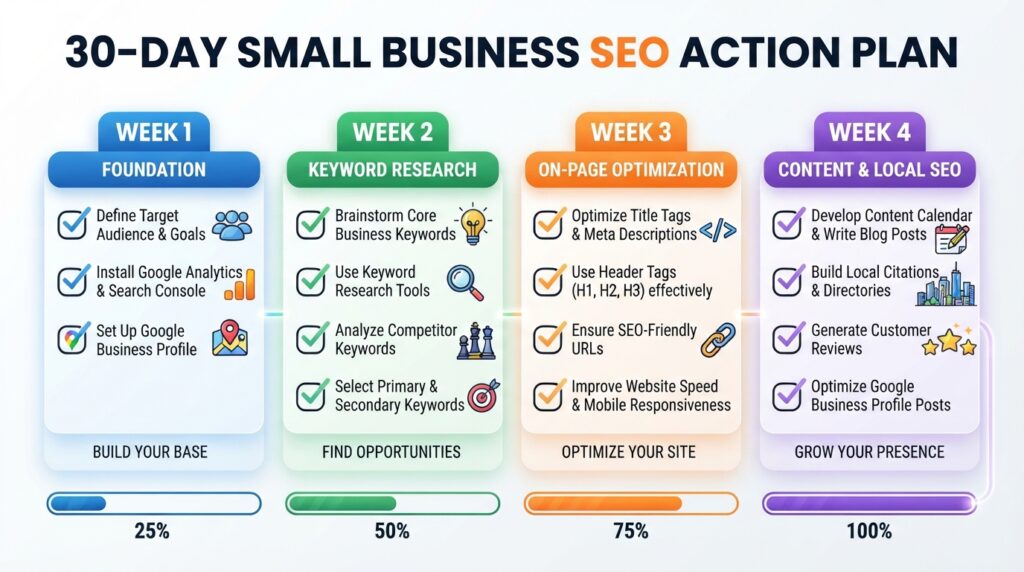
- Set up Google Search Console and submit your sitemap
- Install Google Analytics 4
- Claim and complete your Google Business Profile
- Check that your site has an SSL certificate (https)
- Run your site through Google’s Mobile-Friendly Test
Week 2: Keyword Research
- List 20 questions customers ask about your business
- Identify 10 primary keywords for your main services
- Check competitor websites for keyword ideas
- Choose 3 keywords to optimize existing pages for
Week 3: On-Page Optimization
- Update title tags and meta descriptions on your top 5 pages
- Add proper heading structure to your service pages
- Optimize images with descriptive filenames and alt text
- Add internal links between related pages
Week 4: Content and Local SEO
- Create or improve one detailed service page
- Add an FAQ section to one service page using real customer questions
- Post 5+ photos to your Google Business Profile
- Ask 3 happy customers for Google reviews
- Plan your content calendar for the next 3 months
Month 2 and Beyond
- Publish 2-4 new content pieces per month
- Monitor Google Search Console weekly for issues
- Review analytics monthly to track progress
- Build local citations and directory listings
- Consider upgrading to paid AI SEO tools when you’re ready for deeper insights
Key Takeaway
Small business SEO in 2026 is about consistently doing the fundamentals well—not abou finding shortcuts. Set up your foundation correctly, create content that genuinely helps your customers, optimize for local searches if you serve a specific area, and be patient. Most small businesses that fail at SEO don’t fail because of algorithm changes or competition—they fail because they stop before results appear. Stick with it for 6 months, track your progress, and adjust based on what the data tells you.
Ready for the next step? Now that you understand SEO fundamentals, explore our guide to the best AI SEO tools for small businesses to find tools that can speed up your implementation. If you’re unsure whether to handle SEO yourself or hire help, our AI SEO versus manual SEO comparison will help you decide. And if you need to figure out your budget first, our SEO budget planning guide will help you determine the right investment for your business stage.
