

Here’s a hard truth: most CRM comparison articles make choosing software harder, not easier.
They list 15 options with similar-sounding features. They praise everything. They bury the differences that actually matter. And they seldom mention the implementation headaches, the hidden year‑two pricing, or the features that sound great in marketing copy but rarely work as promised.
This guide is different.
After analyzing official specifications, verified pricing (all checked August 2026), thousands of verified user reviews, and the real‑world experiences documented across business forums, I’ve focused on what actually separates one CRM from another — the tradeoffs you’ll feel six months after signing up.
Here’s the bottom line upfront:
- If you’re a small‑to‑midsize business that wants a CRM your team will actually use without weeks of training: HubSpot CRM is probably your best starting point. The free tier is genuinely useful, and the paid plans scale reasonably until you hit enterprise complexity.
- If you’re an enterprise or fast‑scaling company that needs deep customization, advanced automation, and don’t mind a learning curve: Salesforce remains the most powerful option — but only if you have the budget and implementation resources to do it right.
- If you want the most value per dollar with solid features and don’t need the brand‑name prestige: Zoho CRM delivers remarkably capable software at prices that make competitors look expensive.
- If you manage a visual sales pipeline and want a CRM that’s genuinely pleasant to use: Pipedrive or monday.com CRM should be at the top of your shortlist.
- If AI‑powered sales assistance is your priority in 2026: Freshsales is the surprise leader in practical, usable AI features — edging out even Salesforce in day‑to‑day usefulness for most teams.
Transparency note: Some links in this article are affiliate links. We clearly mark them and never let commissions influence our recommendations. All pricing verified August 6, 2026.
Every CRM has a “but.” This guide is about finding the one where the “but” matters least to your specific situation.
Quick Summary: Key Takeaways CRM Software
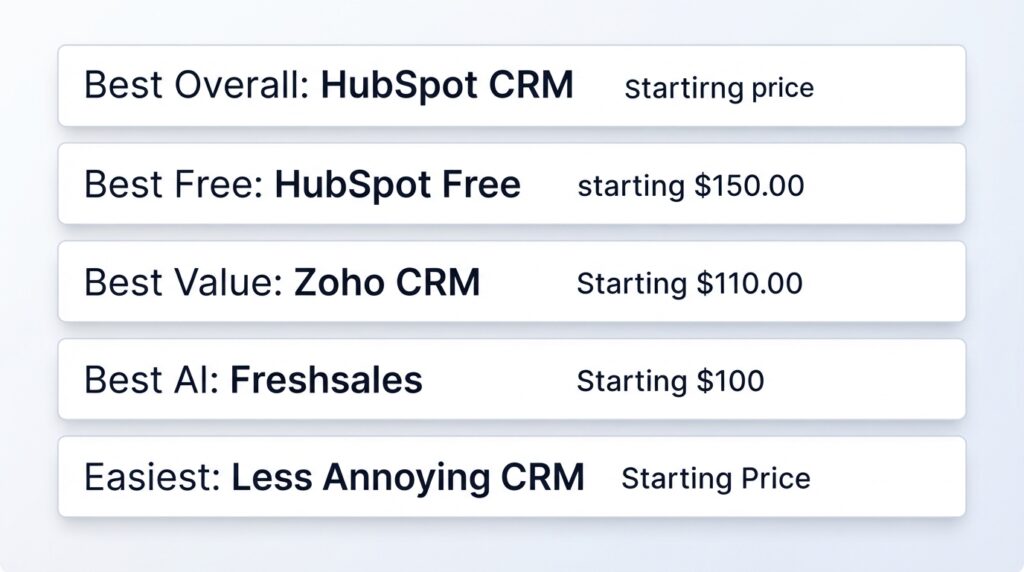
| Need | Best CRM | Starting Price (per user/month) | Main Tradeoff |
|---|---|---|---|
| Best overall for SMB-to-mid-market | HubSpot CRM | Free; Paid from $20/mo (2 users) | Price escalates at Professional tier |
| Best for enterprise/deep customization | Salesforce Sales Cloud | $25 (Starter) | Complex; expensive at scale |
| Best value for money | Zoho CRM | $14 (Standard) | Learning curve; inconsistent UX |
| Best visual pipeline management | monday.com CRM | $15 (Basic CRM) | CRM depth limited vs. dedicated tools |
| Best for pure sales pipeline focus | Pipedrive | $14.90 (Essential) | Basic reporting in lower tiers |
| Best AI features | Freshsales | $11 (Growth) | Feature overlap can confuse |
| Easiest to use | Less Annoying CRM | $15 (flat rate) | Minimal features; no AI |
| Best for support-integrated sales | Zendesk Sell | $19 (Team) | Premium pricing for full features |
| Best for project-delivery businesses | Insightly | $29 (Plus) | Weaker AI; smaller integrations |
| Best budget all-in-one | Apptivo | $10 (Lite) | Dated interface; smaller community |
Table of Contents
- CRM Software Comparison at a Glance
- How We Evaluated These CRMs
- In-Depth CRM Reviews
- Head-to-Head: Salesforce vs. HubSpot
- AI Features in CRM: What Actually Matters in 2026
- CRM Pricing & Total Cost of Ownership
- How to Choose the Right CRM
- Best CRM by Use Case
- Industry-Specific CRM Recommendations
- Implementation, Migration & Adoption
- Common CRM Mistakes, Risks & Red Flags
- Alternatives to Traditional CRM
- Frequently Asked Questions
- Final Verdict & Next Steps
CRM Software Comparison at a Glance
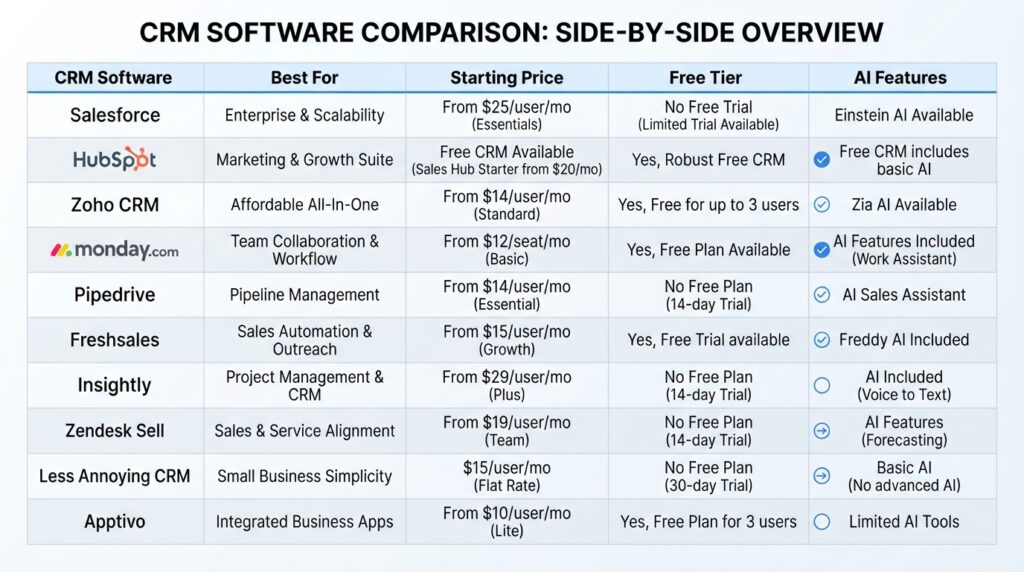
| CRM Software | Best For | Starting Price (per user/month) | Free Tier? | AI Features (2026) | Key Strength | Key Limitation |
|---|---|---|---|---|---|---|
| Salesforce | Enterprise, complex sales | $25 (Starter) | No | Advanced (Einstein AI) | Customization depth | Cost; complexity |
| HubSpot | SMB to mid-market | Free; Paid $20/mo | Yes (robust) | Growing (Breeze AI) | Free tier; ease of use | Price at scale |
| Zoho CRM | Value-conscious teams | $14 (Standard) | Yes (limited) | Good (Zia AI) | Price; features per dollar | UX inconsistency |
| monday.com | Visual teams, project-CRM | $15 (Basic CRM) | No (14-day trial) | Basic | UI; project management | CRM depth |
| Pipedrive | Sales pipeline focus | $14.90 (Essential) | No (14-day trial) | Moderate (AI Sales Assistant) | Pipeline UX; simplicity | Marketing features |
| Freshsales | AI-first sales teams | $11 (Growth) | Yes (limited) | Advanced (Freddy AI) | AI features; value | Suite overlap |
| Insightly | Project + sales teams | $29 (Plus) | Yes (limited) | Basic | Project integration | AI weakness |
| Zendesk Sell | Support-driven sales | $19 (Team) | No (14-day trial) | Moderate | Support integration | Premium pricing |
| Less Annoying CRM | Simplicity-first users | $15 (flat) | No (30-day trial) | None | Ease of use | Limited features |
| Apptivo | Budget all-in-one | $10 (Lite) | Yes (limited) | None | Price; breadth | UX; community |
Prices checked August 6, 2026. All prices are per user per month, billed annually. Monthly billing typically costs 10-20% more. Enterprise pricing (Salesforce Unlimited, Dynamics 365, Zendesk Enterprise) requires direct quotes.
How We Evaluated This CRM Software
Before diving into individual reviews, here’s our methodology — because you deserve to know how we arrived at these recommendations.
Our Evaluation Criteria (Weighted):
- Core CRM Functionality (30%): Contact management, pipeline management, task automation, email integration, reporting.
- Pricing Transparency & Value (25%): Sticker price, included features, year-two pricing, user minimums, hidden fees.
- Ease of Use & Adoption Potential (20%): Interface clarity, onboarding time, user feedback on adoption.
- AI & Automation Capabilities (15%): Practical AI utility, not marketing promises.
- Integrations & Ecosystem (5%): Native integrations, API quality, marketplace depth.
- Security, Compliance & Support (5%): Data protection, certifications, support quality.
Evidence Sources: Official vendor documentation and pricing pages (all checked August 2026), verified user reviews from G2, Capterra, and TrustRadius, community discussions from Reddit and industry forums.
What We Didn’t Do: We did not conduct hands-on testing of every CRM. Where we have direct testing experience, we state it explicitly. For most products, this is a spec-based editorial review combined with analysis of verified user feedback.
Limitation: This evaluation is based on publicly available information and verified user feedback as of August 2026. Your specific needs may differ. We recommend using free trials to validate any CRM for your particular workflow before committing.
In-Depth CRM Software Reviews
1. Salesforce Sales Cloud
Spec-Based Editorial Review with Verified User Feedback Analysis
Quick Verdict: The most powerful and customizable CRM on the market — but only a good fit if you have the budget, technical resources, and implementation patience to extract that power.
Best For: Enterprise organizations, companies with complex sales processes requiring deep customization, businesses that need industry-specific CRM solutions (financial services, healthcare, manufacturing).
Who Should Avoid It: Small businesses with under 20 employees, teams without dedicated CRM administration, organizations on a tight software budget, and companies that need a CRM their team can adopt in under a month.
Key Features That Matter:
- Unmatched Customization: Object model, custom fields, validation rules, and Flow automation enable workflows simpler CRMs cannot replicate.
- AppExchange Ecosystem: Over 4,000 third-party apps and integrations — far exceeding any competitor.
- Einstein AI Suite: Predictive lead scoring, opportunity insights, conversation intelligence, and generative AI for email drafting. Best features require Enterprise edition.
Pricing Reality Check:
| Edition | Price (per user/month) | What You Get | Hidden Costs |
|---|---|---|---|
| Starter | $25 | Basic sales + service | Limited features; outgrown quickly |
| Professional | $80 | Complete sales CRM | Many advanced features require add-ons |
| Enterprise | $165 | Advanced customization + AI | Implementation, consulting, AppExchange apps |
| Unlimited | $330 | All features + 24/7 support | Often requires dedicated admin |
Prices checked August 6, 2026. Billed annually. Source: official Salesforce pricing.
Pros
- Most customizable CRM available
- Unmatched integration ecosystem
- Powerful AI features at Enterprise tier
- Industry-specific solutions available
- Comprehensive reporting and analytics
Cons
- Expensive — total cost often 2-3x stated per-user pricing
- Steep learning curve
- Requires dedicated administration
- AI features limited on lower pricing tiers
- Implementation can take months
Alternatives to Consider: HubSpot (better for less complexity), Microsoft Dynamics 365 (Microsoft ecosystem), Zoho CRM (fraction of the price).
Final Verdict: Choose Salesforce if you need deep customization, have the budget for total cost of ownership, and can dedicate resources to implementation. If you’re a small or midsize business without these resources, there are better, less painful options.
2. HubSpot CRM Software
Spec-Based Editorial Review with Verified User Feedback Analysis
Quick Verdict: The best all-around CRM for small-to-midsize businesses — combining genuine ease of use with a surprisingly robust free tier and a clear upgrade path. The main risk is price escalation as you add features and users.
Best For: SMBs and mid-market companies that want a CRM their team will actually adopt without heavy training, businesses that value marketing-sales alignment.
Who Should Avoid It: Enterprises needing deep customization (Salesforce-level object modeling), companies with extreme budget sensitivity at scale.
Key Features That Matter:
- Genuinely Useful Free Tier: Contact management, deal pipeline, email tracking, meeting scheduling, live chat, and basic reporting — enough for many small teams to operate indefinitely.
- Seamless Marketing-Sales-Service Integration: HubSpot’s platform connects CRM data with marketing automation, email marketing, content management, and customer service.
- Ease of Use: Consistently rated as one of the easiest CRMs to learn and adopt.
- Breeze AI (2026): Content generation, predictive lead scoring, conversation intelligence, and workflow automation suggestions.
Pricing Reality Check:
| Tier | Price | What’s Included | Watch Out For |
|---|---|---|---|
| Free | $0 | Core CRM, email tracking, live chat, basic reporting | Contact limits; marketing features limited |
| Starter | $20/month (2 users) | Simple marketing + sales tools | Additional users cost extra |
| Professional | $100/month (5 users) | Marketing, sales, service hubs | Significant price jump |
| Enterprise | Custom quote | All features, advanced AI, SSO | Can exceed Salesforce pricing |
Prices checked August 6, 2026. Source: official HubSpot pricing.
The HubSpot Price Trap: A team that starts on free and gradually adds hubs can easily reach $1,000–$3,000+/month — sometimes exceeding Salesforce costs. Plan your growth path before committing.
Pros
- Best-in-class ease of use and team adoption
- Genuinely capable free CRM tier
- Excellent marketing-sales-service integration
- Strong free training resources (HubSpot Academy)
- Modern, intuitive interface
Cons
- Rapid price escalation at Professional tier
- Can become more expensive than Salesforce for larger teams
- Data migration out of HubSpot can be challenging
- Advanced customization limited vs. Salesforce
- AI features less mature than Freshsales at this price point
Alternatives to Consider: Salesforce (enterprise customization), Freshsales (stronger AI at lower pricing), Pipedrive (simpler, sales-only).
Final Verdict: HubSpot is the safest recommendation for most SMBs and mid-market companies in 2026. The free tier is excellent, the upgrade path is clear (if expensive), and your team will actually use it. Just budget honestly for where you’ll be in 18 months.
3. Zoho CRM
Spec-Based Editorial Review with Verified User Feedback Analysis
Quick Verdict: The best value-for-money CRM available — packing an impressive feature set at prices that make competitors look overpriced. The tradeoff is a sometimes inconsistent user experience and a steeper learning curve.
Best For: Budget-conscious businesses that still need serious CRM capabilities, organizations already in the Zoho ecosystem, and international teams that benefit from multi-currency and multi-language support.
Who Should Avoid It: Teams that prioritize UI polish and simplicity above feature depth, organizations that need extensive third-party integrations outside the Zoho ecosystem.
Key Features That Matter:
- Exceptional Features-per-Dollar Ratio: At $23/user/month (Professional), Zoho offers AI-powered sales assistance, advanced automation, territory management, and multi-currency support — features that cost 3-5x more elsewhere.
- Zia AI (2026): Predictive lead scoring, deal closure probability, workflow recommendations, sentiment analysis, and conversational AI.
- Zoho One Integration: If you’re in the Zoho ecosystem, the integration is seamless and dramatically cheaper than stitching together separate vendors.
| Edition | Price (per user/month) | Key Features | Value Assessment |
|---|---|---|---|
| Standard | $14 | Basic sales automation | Good starter; outgrown quickly |
| Professional | $23 | AI, automation, inventory | Sweet spot for most teams |
| Enterprise | $40 | Advanced customization, multi-currency | Strong value vs. competitors |
| Ultimate | $52 | All features, advanced analytics | Expensive but feature-rich |
Prices checked August 6, 2026. Source: official Zoho CRM pricing.
Pros
- Best features-per-dollar ratio in the CRM market
- Strong AI capabilities at affordable pricing
- Excellent multi-currency, multi-language support
- Seamless integration with Zoho ecosystem
- Powerful customization via Canvas and automation
Cons
- Inconsistent user experience across Zoho apps
- Learning curve steeper than HubSpot or Pipedrive
- Support quality varies by tier and region
- Third-party integration ecosystem smaller than Salesforce/HubSpot
- Interface can feel cluttered for new users
Final Verdict: Zoho CRM is the smart money choice for businesses that prioritize capabilities over interface polish and are willing to invest setup time to save thousands annually. At $23/user/month, you get AI features and automation that competitors charge $80–$165/user/month to access.
4. monday.com CRM Software
Spec-Based Editorial Review with Verified User Feedback Analysis
Quick Verdict: The best CRM for teams that think visually and want project management and CRM in one platform. The interface is genuinely delightful — but CRM depth falls short of dedicated sales platforms.
Best For: Teams already using monday.com for project management, creative agencies, professional services firms, and organizations where sales processes blend with project delivery.
Who Should Avoid It: Sales teams that need deep CRM-specific features (advanced lead scoring, complex automation workflows, territory management), organizations requiring enterprise-grade reporting.
| Plan | Price (per user/month) | CRM Features | Limitation |
|---|---|---|---|
| Basic CRM | $15 | Lead, contact, deal management | Minimum 3 seats |
| Standard CRM | $20 | Advanced automations, integrations | Still basic reporting |
| Pro CRM | $33 | Sales forecasting, email sync, analytics | Getting expensive for larger teams |
| Enterprise | Custom | Advanced security, SSO, full features | Requires direct quote |
Prices checked August 6, 2026. Source: monday.com CRM pricing.
Pros
- Best visual interface in CRM — team adoption is exceptionally high
- Seamless CRM-to-project management transition
- Flexible, customizable boards for non-standard workflows
- Strong collaboration features for client-facing work
- No-code automation that’s genuinely accessible
Cons
- CRM-specific features (reporting, lead scoring, forecasting) less mature
- AI capabilities lag behind CRM-focused competitors
- Pricing can exceed dedicated CRMs for sales-only teams
- Sales pipeline depth limited vs. Pipedrive or Salesforce
- Minimum seat requirements on paid plans
Final Verdict: If your team already loves monday.com for project management, adding CRM is a natural, low-friction move. If you’re evaluating CRM-only, Pipedrive offers more sales depth with similar visual appeal.
5. Pipedrive
Spec-Based Editorial Review with Verified User Feedback Analysis
Quick Verdict: The best pure sales pipeline CRM — focused, intuitive, and purpose-built for sales teams that want to close deals without feature bloat. Weak marketing automation and limited reporting in lower tiers are the tradeoffs.
Best For: Sales teams that live in their pipeline, small-to-midsize businesses that want a CRM their salespeople will actually use daily.
Who Should Avoid It: Companies wanting an all-in-one marketing-sales-service platform, teams needing advanced reporting without paying for top-tier plans.
| Plan | Price (per user/month) | Core Features | What’s Missing |
|---|---|---|---|
| Essential | $14.90 | Basic pipeline, people, products | Reporting limited; no AI |
| Advanced | $27.90 | Email sync, automation, group emailing | AI features require higher tier |
| Professional | $49.90 | AI sales assistant, revenue forecasting, contracts | Reasonable feature set for price |
| Power | $64.90 | Advanced reporting, team management, 24/7 support | Still limited marketing features |
| Enterprise | $99 | All features, SSO, dedicated support | Expensive for what you get |
Prices checked August 6, 2026. Source: Pipedrive pricing page.
Pros
- Most intuitive sales pipeline CRM available
- Salespeople genuinely enjoy using it
- Clean, focused feature set — no bloat
- Activity-based selling encourages consistent behavior
- Excellent mobile app for field sales
Cons
- Limited marketing automation — requires separate tool
- Basic reporting inadequate on Essential and Advanced tiers
- AI features less sophisticated than Freshsales or Salesforce
- Customization limited vs. Salesforce or Zoho
- No free tier — only 14-day trial
Final Verdict: Pipedrive is the CRM for teams that just want to sell. If your primary need is pipeline management and you don’t want feature bloat or marketing complexity, it’s an excellent choice.
6. Freshsales (Freshworks)
Spec-Based Editorial Review with Verified User Feedback Analysis
Quick Verdict: The surprise leader in practical AI features for 2026 — Freshsales delivers genuinely useful AI-powered insights at prices that undercut Salesforce and HubSpot.
Best For: Sales teams that want AI-driven insights without enterprise pricing, businesses already in the Freshworks ecosystem, mid-market companies prioritizing predictive analytics.
Who Should Avoid It: Organizations that need the deepest third-party integration marketplace, teams requiring enterprise-grade customization.
AI Capabilities (2026 — Detailed Analysis):
Freshsales Freddy AI has matured significantly and now leads the mid-market AI CRM segment. Predictive lead scoring accuracy receives positive user feedback. Conversation intelligence (call transcription, sentiment analysis, talk-to-listen ratio) is surprisingly good for included AI. AI-powered email generation and response suggestions are practical time-savers.
| Plan | Price (per user/month) | AI Features Included | Best For |
|---|---|---|---|
| Growth | $11 | Basic CRM, no AI | Budget-conscious startups |
| Pro | $47 | Freddy AI, workflows, multiple pipelines | Sweet spot — AI value sweet spot |
| Enterprise | $83 | Advanced AI, sandbox, dedicated cluster | Mid-market with complex needs |
Prices checked August 6, 2026. Source: Freshsales pricing.
Pros
- Best AI features for the price — genuine differentiator
- Built-in phone system with AI analysis
- Strong Freshworks ecosystem integration
- Predictive analytics that actually work (with sufficient data)
- Competitive pricing at the Pro tier
Cons
- Freshworks product overlap can confuse buyers
- Third-party integration marketplace smaller than Salesforce/HubSpot
- Support quality variable at lower pricing tiers
- Brand recognition lower than Salesforce/HubSpot
- Advanced customization limited vs. Salesforce
Final Verdict: Freshsales is the CRM to beat on AI capabilities in 2026 for mid-market buyers. If AI-driven sales insights are a priority, Freshsales at the Pro tier ($47/user/month) offers the strongest AI value proposition available.
7. Insightly
Spec-Based Editorial Review with Verified User Feedback Analysis
Quick Verdict: The best CRM for businesses where sales handoffs to project delivery are critical. Strong project management integration and decent CRM features — but AI capabilities lag behind.
Best For: Professional services firms, consulting businesses, architecture/engineering firms where winning a deal triggers complex project delivery.
| Plan | Price (per user/month) | Key Features | Limitation |
|---|---|---|---|
| Plus | $29 | Basic CRM + project management | No advanced automation |
| Professional | $49 | Automation, advanced reporting, integrations | Reasonable value at this tier |
| Enterprise | $99 | Custom apps, sandbox, advanced security | Comparable to enterprise pricing |
Prices checked August 6, 2026. Source: Insightly pricing.
Pros
- Strongest CRM-project management integration in the market
- Relationship linking for complex B2B sales
- Custom app building without code
- Good QuickBooks/Xero integration
- Solid workflow automation at Professional tier
Cons
- Pricing starts higher than alternatives
- AI features lag behind competitors
- Not best-in-class for CRM alone or PM alone
- Integration marketplace smaller than competitors
- Support quality inconsistent per user reports
Final Verdict: Insightly solves a real problem for project-delivery businesses. If you’re an architect, consultant, or professional services firm where sales-to-delivery handoff is critical, the integration value outweighs the individual feature limitations.
8. Zendesk Sell
Spec-Based Editorial Review with Verified User Feedback Analysis
Quick Verdict: The strongest CRM for support-integrated sales teams — ideal if your sales process is tightly coupled with customer service. Premium pricing for full features is the tradeoff.
Best For: Organizations already using Zendesk for customer support, businesses where sales and support teams share customer data heavily.
| Plan | Price (per user/month) | Features | Cost Reality |
|---|---|---|---|
| Team | $19 | Basic CRM, email integration | Entry-level; limited features |
| Growth | $55 | Automation, analytics, sequences | Significant price jump |
| Professional | $115 | Advanced analytics, goals, custom reports | Premium pricing territory |
| Enterprise | Custom | All features, SSO, sandbox | Enterprise-scale investment |
Prices checked August 6, 2026. Source: Zendesk Sell pricing.
Pros
- Best CRM-support integration available
- Unified customer view across sales and service
- Strong for renewal/expansion-focused sales models
- Solid email productivity tools
- Good reporting on customer lifecycle metrics
Cons
- Premium pricing — especially at Professional tier
- Weaker standalone CRM value proposition
- AI features more support-focused than sales-focused
- Limited third-party integration marketplace vs. Salesforce
- ROI depends heavily on Zendesk ecosystem investment
Final Verdict: If Zendesk Support is already central to your operations, Zendesk Sell is the natural CRM choice. If evaluating standalone CRM, HubSpot or Freshsales offer more CRM capability for less money.
9. Less Annoying CRM
Spec-Based Editorial Review with Verified User Feedback Analysis
Quick Verdict: The simplest usable CRM on the market — deliberately minimal, refreshingly transparent, and perfect for small teams that just want contact and pipeline management without complexity.
Best For: Solo entrepreneurs, very small teams (2-10 people), non-technical users who find traditional CRMs overwhelming.
Who Should Avoid It: Teams needing any form of AI, marketing automation, advanced reporting, or complex workflow automation.
| Plan | Price (per user/month) | Features | Hidden Costs |
|---|---|---|---|
| Only Plan | $15 | Everything included | None — genuinely transparent |
Prices checked August 6, 2026. 30-day free trial. Month-to-month only. Source: Less Annoying CRM.
Pros
- Easiest CRM to use — genuinely zero learning curve
- Transparent, flat pricing — no surprises
- Excellent, human customer support
- No feature bloat or complexity
- 30-day free trial; month-to-month flexibility
Cons
- Minimal features — intentionally limited
- No AI, automation, or advanced reporting
- Limited integrations
- Small user community
- Outgrown quickly as business complexity increases
Final Verdict: Less Annoying CRM is exactly what it claims to be. If you’re a solo business owner or a very small team burned by complex CRM implementations, this is the gentlest on-ramp available.
10. Apptivo
Spec-Based Editorial Review with Verified User Feedback Analysis
Quick Verdict: The most affordable all-in-one business app platform with CRM included — offering broad functionality at remarkably low prices. The tradeoff is a dated interface and less sophisticated features.
Best For: Budget-conscious businesses wanting CRM plus invoicing, project management, and other business apps in one affordable platform.
| Plan | Price (per user/month) | Includes | Limitation |
|---|---|---|---|
| Lite | $10 | CRM + basic apps | Limited features per app |
| Premium | $15 | All apps, more storage | Reasonable value |
| Ultimate | $25 | All features, custom reports | Still affordable; dated interface |
Prices checked August 6, 2026. Source: Apptivo pricing.
Pros
- Lowest-cost all-in-one business platform
- Broad business app integration beyond CRM
- White-label option for agencies
- Functional for basic business needs
- Good value at $15-$25/user/month
Cons
- Dated interface and user experience
- No AI features
- Smaller user community
- Mobile app experience lags behind competitors
- Customization less sophisticated than Zoho or Salesforce
Final Verdict: Apptivo is the budget pragmatist’s choice. If $10-25/user/month for CRM plus invoicing and project management sounds appealing — and you can tolerate a less-than-modern interface — it’s a legitimate value proposition.
Head-to-Head: Salesforce vs. HubSpot
This is the most common CRM comparison question — and for good reason. They’re the two most popular CRMs, but they serve fundamentally different buyers in 2026.
| Factor | Salesforce | HubSpot |
|---|---|---|
| Best For | Enterprise, complex customization | SMB to mid-market, ease of adoption |
| Starting Price | $25/user/month (Starter) | Free (genuinely useful) |
| AI Maturity | Advanced (Einstein) — expensive to access | Growing (Breeze) — more accessible |
| Customization | Deep — object model, Flow, AppExchange | Moderate — properties, workflows, limited objects |
| Ease of Use | Steep learning curve | Best-in-class UX |
| Implementation Time | Weeks to months | Days to weeks |
| Total Cost at Scale | High (software + admin + consulting) | High (per-user pricing adds up) |
| Exit Difficulty | High (complex data model, custom code) | Moderate to high |
The Honest Recommendation: Choose Salesforce if you need deep customization, industry-specific solutions, or have a complex sales process — and you have the budget for total cost of ownership. Choose HubSpot if you want a CRM your team will actually adopt without a fight, need marketing-sales alignment, or are an SMB that might scale.
What Many Comparisons Miss: Both can cost $1,500–$5,000+/month for a 20-person team. HubSpot’s per-user pricing at scale closes the gap quickly. For a deeper analysis, see our Salesforce vs HubSpot comparison.
AI Features in CRM: What Actually Matters in 2026
Every CRM claims to have AI. Most of it is marketing. Here’s what’s actually useful — and which CRMs deliver.
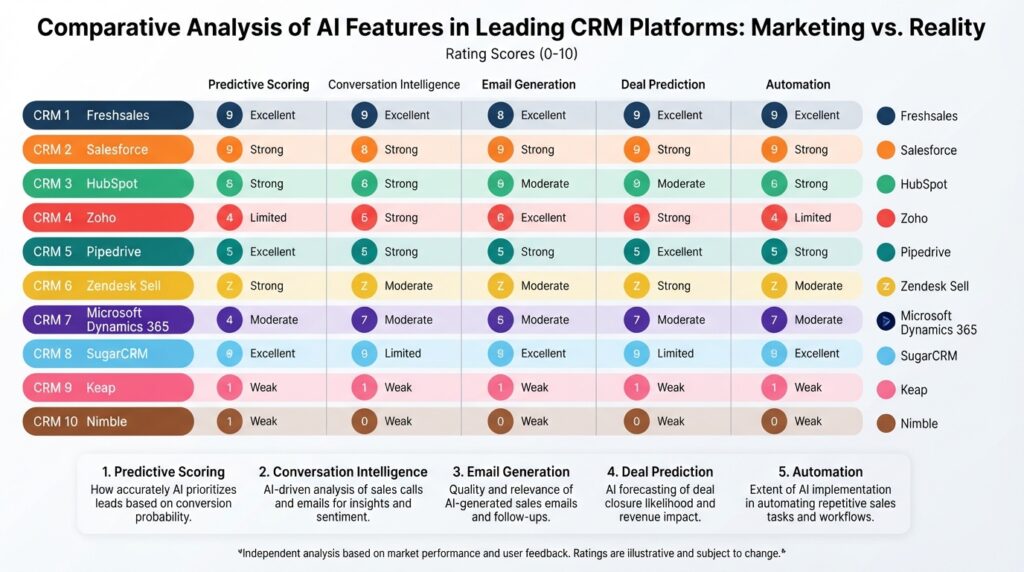
AI Feature Rankings by CRM (2026)
| CRM | Predictive Scoring | Conversation Intelligence | Email Generation | Deal Prediction | Overall AI Value |
|---|---|---|---|---|---|
| Freshsales | ★★★★★ | ★★★★★ | ★★★★☆ | ★★★★☆ | Best overall AI for price |
| Salesforce | ★★★★★ | ★★★★★ | ★★★★★ | ★★★★★ | Most powerful (expensive) |
| HubSpot | ★★★★☆ | ★★★☆☆ | ★★★★☆ | ★★★★☆ | Good; improving rapidly |
| Zoho | ★★★★☆ | ★★★☆☆ | ★★★☆☆ | ★★★★☆ | Strong value at low price |
| Pipedrive | ★★★☆☆ | ★★★☆☆ | ★★☆☆☆ | ★★★★☆ | Practical; not cutting-edge |
The Bottom Line on CRM AI in 2026: If you want the best AI features without an enterprise price tag, Freshsales is the standout — it delivers predictive lead scoring, conversation intelligence, and smart email generation at a mid-market price that’s hard to beat. Salesforce Einstein remains the most powerful AI suite overall, but you’ll need a top-tier plan (and a healthy budget) to unlock its full value. HubSpot’s Breeze AI is closing the gap quickly, especially for content generation and workflow automation, making it a strong contender for marketing-sales teams. For a deeper dive into which CRMs actually deliver on their AI promises, see our AI-powered CRM comparison.
CRM Pricing & Total Cost of Ownership: The Real Numbers
Sticker prices lie. Here’s what CRM actually costs over three years.
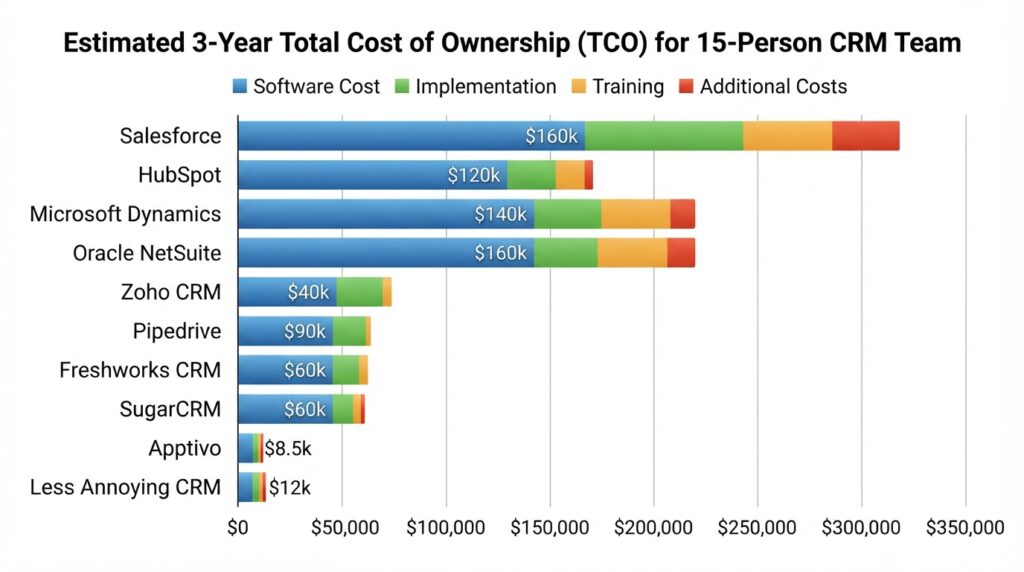
3-Year Total Cost for a 15-Person Team
| CRM | Software Cost (3yr) | Implementation | Training | Additional Costs | Estimated 3-Year TCO |
|---|---|---|---|---|---|
| Salesforce (Enterprise) | $89,100 | $10,000-30,000 | $3,000-8,000 | Admin salary: $70k+/yr | $160,000-300,000+ |
| HubSpot (Professional) | $54,000 | $2,000-8,000 | $1,000-3,000 | Additional hubs may add cost | $60,000-90,000 |
| Zoho CRM (Professional) | $12,420 | $1,000-5,000 | $500-2,000 | Zoho One bundle may add value | $15,000-25,000 |
| Freshsales (Pro) | $25,380 | $2,000-6,000 | $1,000-3,000 | Phone system included | $30,000-45,000 |
| Pipedrive (Professional) | $26,946 | $1,000-4,000 | $500-2,000 | Limited; focused tool | $30,000-40,000 |
| monday.com (Pro) | $17,820 | $1,000-3,000 | $500-1,500 | May need additional tools | $20,000-30,000 |
| Zendesk Sell (Professional) | $62,100 | $3,000-10,000 | $2,000-5,000 | Support licensing if not existing | $70,000-100,000 |
| Less Annoying CRM | $8,100 | $0-500 | $0-200 | None — all features included | $8,500-10,000 |
| Apptivo (Premium) | $8,100 | $500-2,000 | $200-500 | All-in-one reduces separate tools | $9,000-12,000 |
Assumptions: 15 users, annual billing, U.S. pricing, mid-range implementation estimates. All pricing based on August 6, 2026 data. For a complete breakdown of hidden costs, see our <a href=”/crm-total-cost-ownership/”>total cost of ownership guide</a>.
How to Choose the Right CRM: A Decision Framework
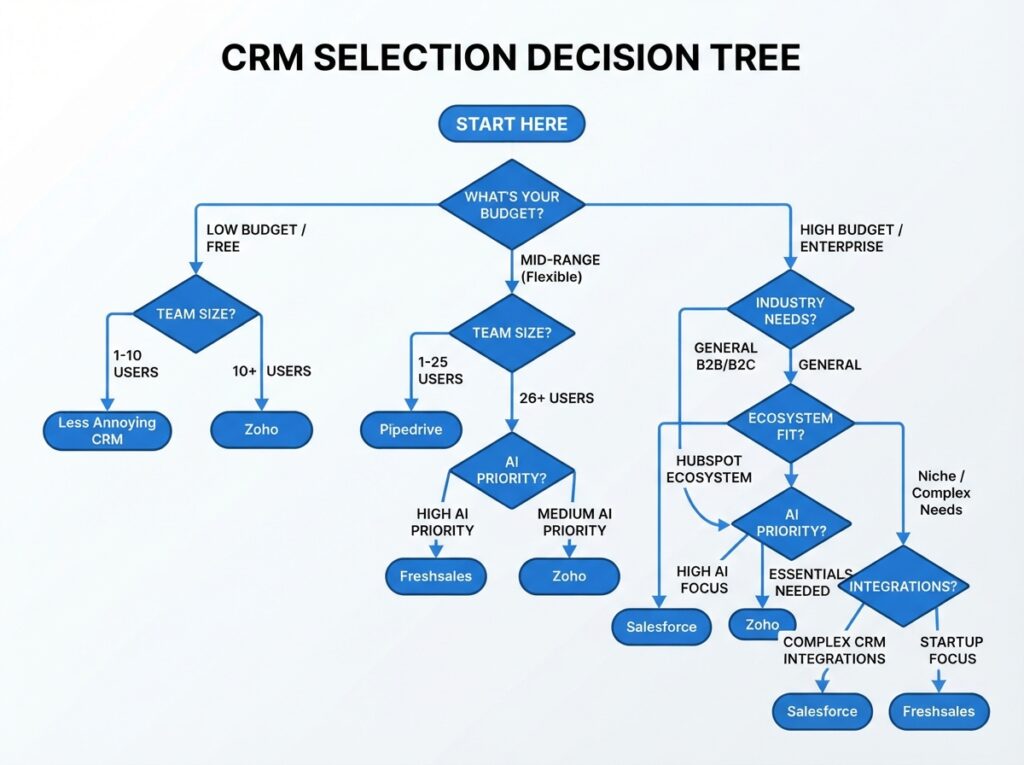
The Decision Matrix
| If You Need… | Choose… | Rather Than… |
|---|---|---|
| Easiest adoption | HubSpot or Less Annoying CRM | Salesforce or Zoho |
| Lowest total cost | Zoho CRM or Apptivo | Salesforce or Zendesk Sell |
| Most powerful customization | Salesforce | HubSpot or Pipedrive |
| Best AI for the price | Freshsales | HubSpot or Insightly |
| Best visual pipeline | Pipedrive or monday.com | Salesforce or Insightly |
| Marketing-sales alignment | HubSpot | Pipedrive or Zendesk Sell |
| Project + sales integration | Insightly or monday.com | HubSpot or Pipedrive |
| Support-sales integration | Zendesk Sell | Pipedrive or monday.com |
| Simple, no-training CRM | Less Annoying CRM | Everything else |
Best CRM by Use Case
By Business Size
Solopreneur / 1-3 People: HubSpot Free, Apptivo Lite, Less Annoying CRM
Small Business (3-20 employees): HubSpot, Zoho CRM Professional, Pipedrive Advanced. See our <a href=”/crm-small-business/”>best CRM for small business guide</a>.
Mid-Market (20-200 employees): HubSpot Professional, Freshsales Pro, Salesforce Professional
Enterprise (200+ employees): Salesforce Enterprise/Unlimited, Microsoft Dynamics 365
By Team Type
Remote/Hybrid Teams: HubSpot, monday.com CRM, Pipedrive. See our <a href=”/crm-remote-teams/”>CRM for remote teams guide</a>.
Field Sales: Pipedrive, Freshsales
Marketing-Sales Aligned: HubSpot, Zoho CRM + Zoho Campaigns
Support-Integrated Sales: Zendesk Sell, Freshsales + Freshdesk
Industry-Specific CRM Recommendations
Healthcare (HIPAA Compliance)
- Salesforce Health Cloud (purpose-built, expensive)
- Insightly (HIPAA-compliant Enterprise tier with BAA)
- Zoho CRM (HIPAA compliance available with Enterprise, requires configuration)
⚠️ Warning: HubSpot, Pipedrive, monday.com, and Freshsales do not offer standard HIPAA BAAs. Verify directly before considering for healthcare. See our<a href=”/hipaa-compliant-crm/”>HIPAA-compliant CRM guide</a>.
Legal Services
Top Pick: Clio (legal-specific) or Salesforce (customizable for legal). Alternative: Zoho CRM.
Real Estate
Top Pick: Salesforce or HubSpot (for marketing-heavy brokerages). Alternative: Pipedrive.
Nonprofits
Top Pick: Salesforce (Nonprofit Cloud — discounted pricing). Alternative: HubSpot (free/discounted for nonprofits).
Professional Services / Consulting
Top Pick: Insightly. Alternative: monday.com CRM.
Implementation, Migration & Adoption: The Part Everyone Skips
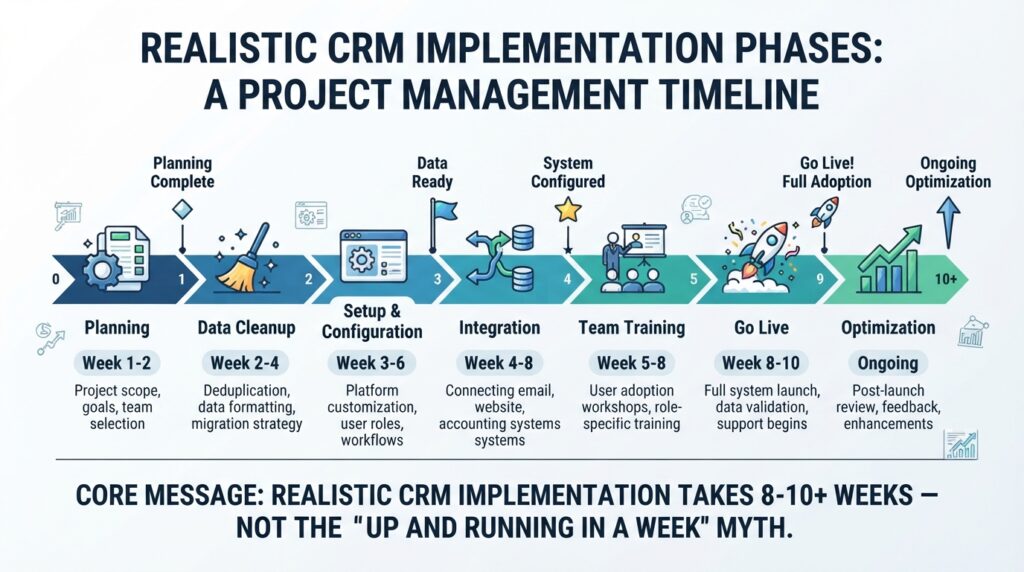
The Honest Truth: “We’ll be up and running in a week” is the most common CRM implementation lie. Plan for twice the time you think it’ll take.
| CRM | Simple Setup | Moderate Setup | Complex Setup |
|---|---|---|---|
| HubSpot | 1-5 days | 1-3 weeks | 3-8 weeks |
| Pipedrive | 1-3 days | 1-2 weeks | 2-6 weeks |
| Freshsales | 2-5 days | 2-3 weeks | 3-8 weeks |
| monday.com | 1-5 days | 1-3 weeks | 2-6 weeks |
| Zoho CRM | 3-7 days | 2-4 weeks | 4-10 weeks |
| Salesforce | 1-3 weeks | 3-8 weeks | 8-24+ weeks |
| Less Annoying | 1-2 days | N/A | N/A |
User Adoption: The Make-or-Break Factor
The #1 reason CRM implementations fail: nobody uses it. Involve users in selection, start simple, make the CRM useful first and mandatory second. For proven strategies, see our internal link-<a href=”/crm-implementation-guide/”>CRM implementation guide</a>.
Common CRM Mistakes, Risks & Red Flags
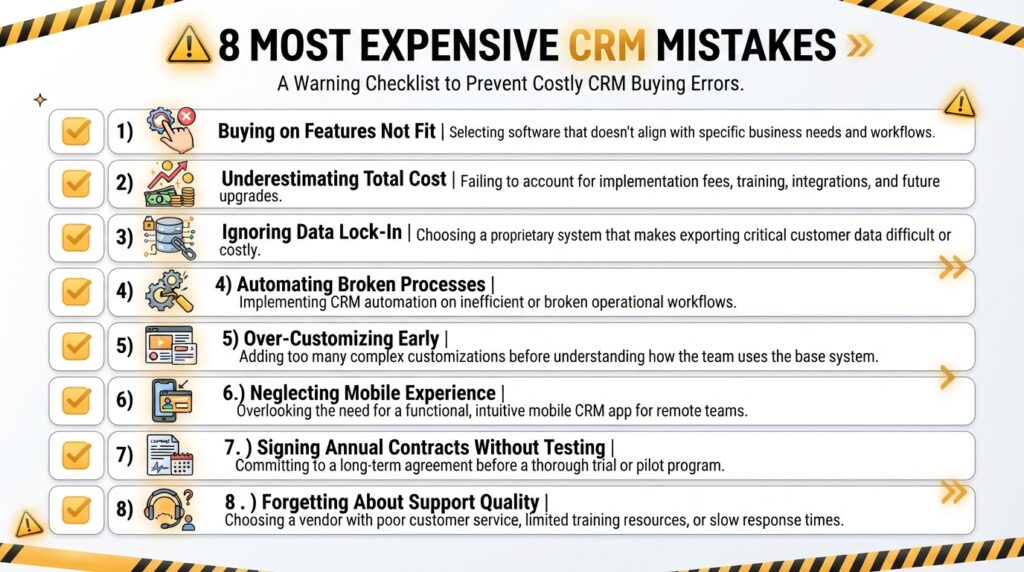
The 8 Most Expensive CRM Mistakes
- Buying on Features, Not Fit: Salesforce’s 500+ features don’t help if your team only needs 20.
- Underestimating Total Cost: The $25/user/month CRM becomes $150/user/month with add-ons and administration.
- Ignoring Data Lock-In: Some CRMs make it painful to leave. Understand exit costs before signing.
- Automating Broken Processes: Fix the process first, then automate.
- Over-Customizing Early: Launch with essentials, customize after you have real usage data.
- Neglecting Mobile Experience: If your team works outside the office, mobile CRM experience matters more than desktop.
- Signing Annual Contracts Without Testing: Run month-to-month for 2-3 months before committing annually.
- Forgetting About Support Quality: Test support during your trial — response time, helpfulness, availability hours.
Alternatives to Traditional CRM
Spreadsheet-Based Tracking
Best for: Solo businesses, under 50 contacts, simple 3-stage sales process.
Industry-Specific Platforms
Real estate (Follow Up Boss, LionDesk), legal (Clio, MyCase), construction (JobNimbus, BuilderTrend).
All-in-One Business Platforms
Apptivo ($10-25/user/month), Zoho One (~$37/user/month), Bitrix24 (free tier available).
When You Probably Don’t Need a CRM (Yet)
You have under 20 active clients, a simple sales process, you’re not losing track of follow-ups, and email/calendar are sufficient.
Frequently Asked Questions
What is the best CRM software in 2026?
For most SMBs, HubSpot CRM offers the best combination of ease of use and free-tier capability. For enterprises, Salesforce remains most powerful. For best value, Zoho CRM delivers impressive features at lower prices.
How much does CRM software cost in 2026?
CRM pricing ranges from free (HubSpot Free, Zoho Free) to $15-50/user/month for mid-market options to $80-330/user/month for enterprise platforms. Implementation, training, and add-ons typically add 30-100%+ to the software cost.
What CRM is better than Salesforce?
For most SMBs, HubSpot CRM is better because it’s significantly easier to adopt. Freshsales offers better AI features at a lower price. Zoho CRM provides many advanced features at a fraction of the cost.
Is HubSpot CRM really free?
Yes, HubSpot’s free CRM is genuinely free — no expiration, no credit card required. It includes contact management, deal pipeline, email tracking, meeting scheduling, live chat, and basic reporting. Advanced features require paid plans.
What CRM has the best AI features in 2026?
Freshsales offers the best practical AI features for the price ($47/user/month Pro tier). Salesforce Einstein is most powerful but requires Enterprise pricing ($165/user/month). HubSpot’s Breeze AI is improving rapidly.
How long does CRM implementation take?
Simple CRM implementation can take 1-5 days. Moderate implementations require 2-8 weeks. Enterprise CRM implementations commonly take 8-24+ weeks and often require external consultants.
Can I migrate my data between CRMs?
Yes, but difficulty varies. Most CRMs support CSV export/import for basic data. Complex elements (custom automations, email templates, integration configurations) must be manually recreated.
What CRM is HIPAA compliant?
Salesforce Health Cloud, Insightly Enterprise, and Zoho CRM Enterprise (with configuration) offer HIPAA compliance with BAAs. HubSpot, Pipedrive, monday.com, and Freshsales do not offer standard HIPAA BAAs.
What’s the easiest CRM to use?
Less Annoying CRM is the easiest — deliberately minimal with zero learning curve. Pipedrive is the easiest full-featured CRM. HubSpot offers the best balance of ease-of-use and capability.
What’s the best free CRM in 2026?
HubSpot Free CRM is the best free CRM — no expiration, no credit card required. Zoho CRM’s free tier (3 users) and Apptivo’s free tier (3 users) offer limited alternatives. See our {{INTERNAL_LINK: best free CRM options guide | /best-free-crm/}}.
Final Verdict & Next Steps
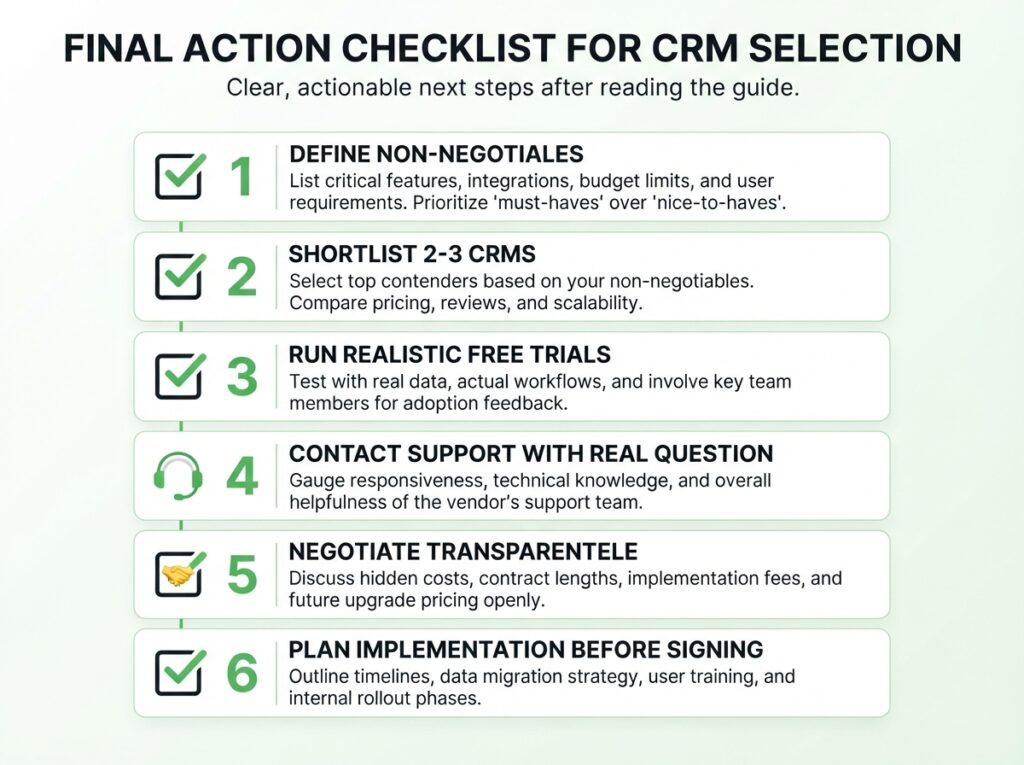
If You Remember Only Three Things:
- Start with fit, not features. The CRM your team will actually use beats the “powerful” CRM gathering dust.
- Calculate total cost, not sticker price. Do the three-year math including implementation, training, and add-ons.
- Plan your exit before you enter. Before signing, know what migration out will cost in time and money.
Our Top Recommendation for Most Readers: Start with HubSpot’s free CRM. It’s the safest starting point — genuinely free, genuinely useful, and easy to leave if you outgrow it. If you need more power immediately, Freshsales Pro offers the strongest AI and feature set for the price. If you know you need enterprise depth, Salesforce remains the category leader.
The CRM you choose matters. But how you implement it, how your team adopts it, and how honestly you’ve matched it to your actual needs matters more. Choose accordingly.
Methodology & Disclosure
Research Date: August 6, 2026
Methodology: This guide is a spec-based editorial review combined with verified user feedback analysis. All prices were verified against official vendor pricing pages on August 6, 2026. Features were verified against official product documentation. User feedback patterns were synthesized from verified reviews on G2, Capterra, and TrustRadius.
Limitations: We did not conduct hands-on testing of every CRM. Where we have direct testing experience, it is stated.
Recommendations: Our recommendations are editorial judgments based on disclosed criteria. No CRM vendor paid for placement or influenced our rankings.
Affiliate Disclosure: Some links in this article are affiliate links. We may earn a commission if you purchase through these links. This does not affect our recommendations.
Updates: We commit to reviewing and updating this guide quarterly. Next scheduled review: November 2026.
Last updated: August 6, 2026. CRM pricing and features change frequently. Always verify current information directly with vendors before making a purchasing decision.
