

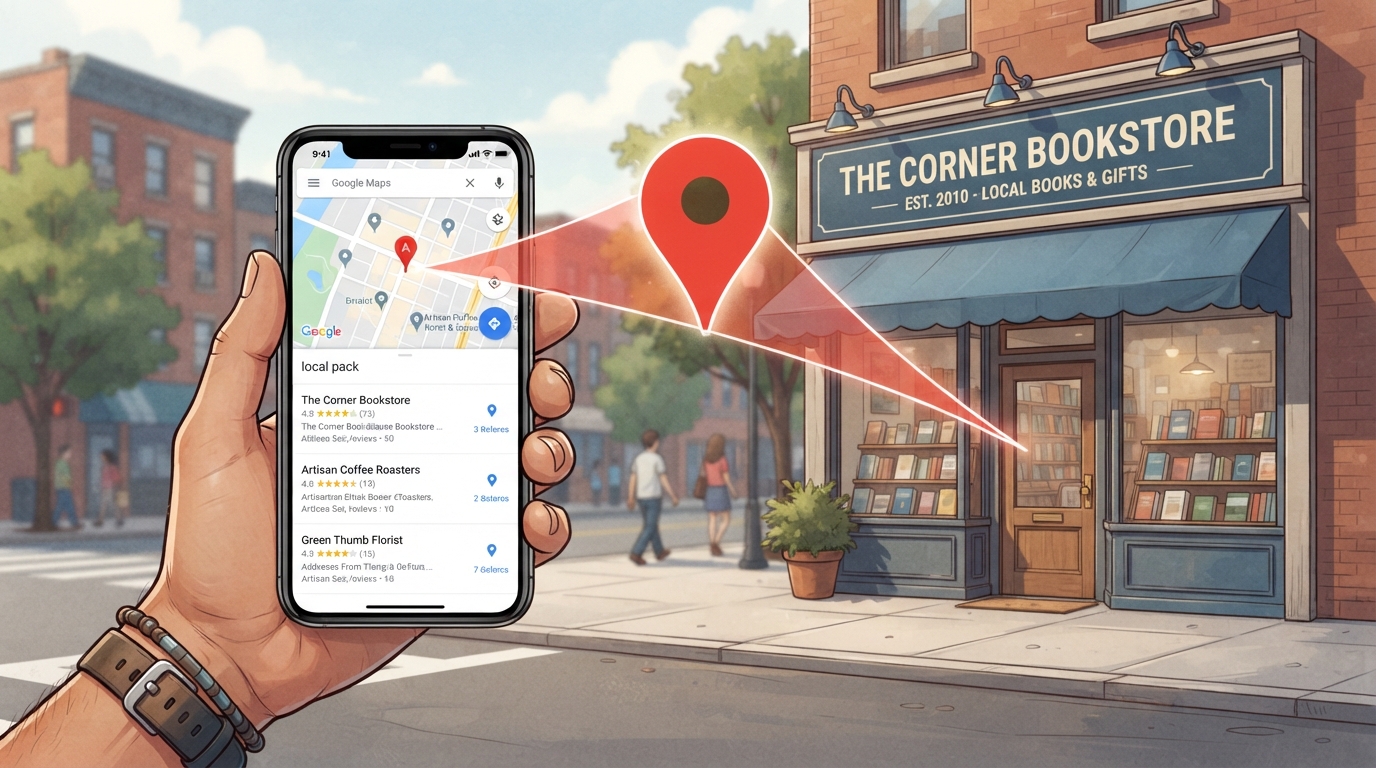
Local SEO for small businesses is the single most effective way to attract nearby customers who are actively searching for your products or services. When someone pulls out their phone and searches “best coffee shop near me” or “emergency plumber in Austin,” the businesses that appear in Google’s local pack—the map and three business listings at the top of results—capture the majority of clicks and calls. If your small business serves a local area, mastering local SEO isn’t optional. It’s the difference between being found by ready-to-buy customers and being invisible to the people searching for exactly what you offer.
This guide walks through seven proven steps for local SEO for small businesses in 2026. We’ll cover everything from optimizing your Google Business Profile to building local citations and generating the reviews that drive local rankings. These strategies work for restaurants, retail shops, service businesses like plumbers and electricians, professional services like lawyers and dentists, and any other business with a physical location or defined service area. If you need the right AI tools to support your local SEO efforts, our guide to the best AI SEO tools for small businesses covers options with strong local features.
Table of Contents
- Why Local SEO for Small Businesses Matters in 2026
- Step 1: Optimize Your Google Business Profile Completely
- Step 2: Find and Target Local Keywords
- Step 3: On-Page SEO for Local Landing Pages
- Step 4: Build Consistent Local Citations
- Step 5: Generate and Manage Customer Reviews
- Step 6: Create Local Content That Attracts Customers
- Step 7: Build Local Backlinks
- Best AI SEO Tools for Local Small Businesses
- Common Local SEO Mistakes Small Businesses Make
- Final Verdict: Your Local SEO Action Plan
Why Local SEO for Small Businesses Matters in 2026
The numbers tell a compelling story about local SEO for small businesses. According to Google’s own data, 46% of all searches have local intent—people looking for products, services, or information in their immediate area. Of those local searches, 76% of people who search for something nearby on their smartphone visit a related business within 24 hours, and 28% of those visits result in a purchase. These aren’t casual browsers. They’re customers with immediate needs and purchase intent.
In 2026, local search has evolved further. AI-powered search results increasingly prioritize businesses with complete, accurate, and active local presences. Google’s local algorithm weighs factors like the completeness of your Google Business Profile, the volume and quality of your customer reviews, the consistency of your business information across the web, and your proximity to the searcher. Understanding these ranking factors is the foundation of effective local SEO for small businesses. For broader SEO fundamentals that support your local efforts, see our complete small business SEO guide.
Step 1: Optimize Your Google Business Profile Completely
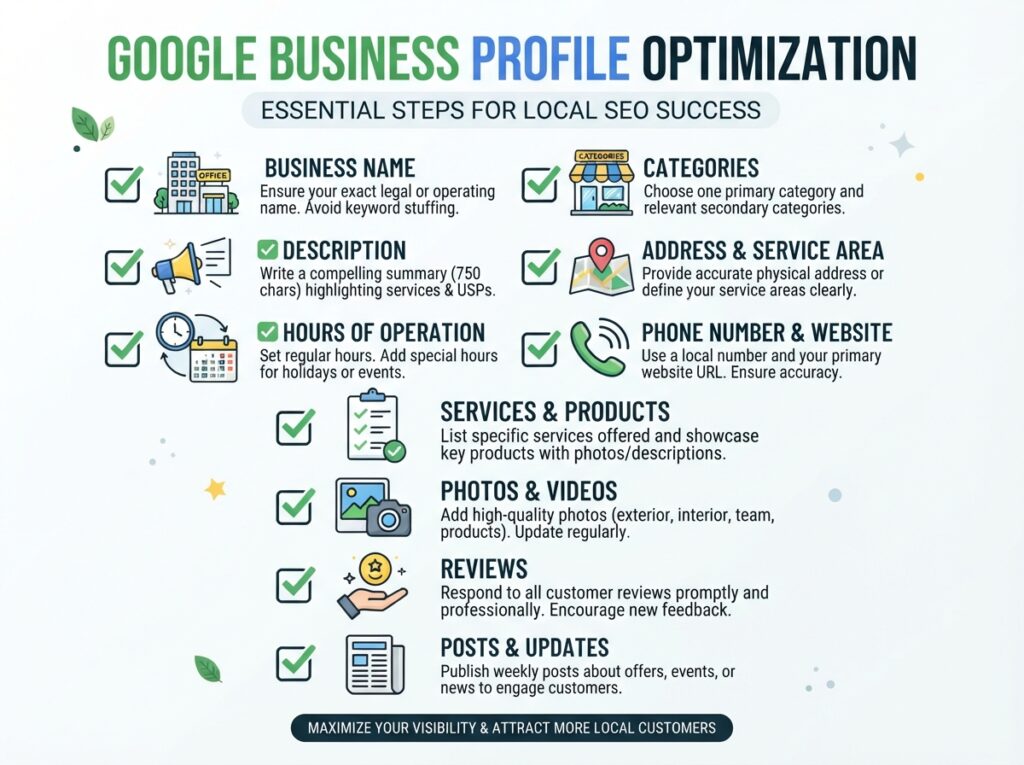
Your Google Business Profile is the single most important asset for local SEO for small businesses. It’s what appears when someone searches your business name, and it’s what Google uses to determine whether to show you in the local pack for relevant searches. An incomplete or neglected profile tells Google that your business isn’t actively managed, which hurts your local rankings.
Complete Every Section
Fill out every field Google provides. Your business name must match exactly what appears on your storefront and signage—don’t add keywords or location modifiers that aren’t part of your real business name. Select your primary business category carefully, as this determines which searches you’re eligible to appear in. Add all relevant secondary categories. Write a detailed business description that includes your services, your location, and what makes you unique. List every service you offer with descriptions. Add your products if applicable. Set your hours accurately, including holiday hours. Add your website URL, phone number, and any appointment booking links.
Add Photos Strategically
Businesses with more photos receive more clicks, more calls, and more direction requests. Add at least 20 high-quality photos: your storefront from different angles, your interior space, your team members (with permission), examples of your work or products, and any unique features of your business. Add new photos weekly—Google views active profiles more favorably. Use geo-tagged photos when possible, as this reinforces your location signals.
Post Regular Updates
Google Business Profile allows you to post updates, offers, events, and tips directly to your profile, much like a mini social media feed. Post at least weekly. Share helpful tips related to your industry, announce special offers, highlight new products or services, and showcase customer success stories. These posts keep your profile active and give Google fresh content to index.
Respond to Every Review
Respond to every review—positive and negative—within 24-48 hours. Thank happy customers by name and mention something specific from their review. For negative reviews, acknowledge the issue, apologize sincerely, and offer to make things right offline. Your responses demonstrate to both Google and potential customers that you’re engaged and care about customer experience.
Google Business Profile Optimization Checklist
- Business name matches real-world signage exactly
- Primary and secondary categories selected
- Complete business description with services and location
- All services listed with descriptions
- Accurate hours including holidays
- 20+ high-quality photos uploaded
- New photos added weekly
- Weekly posts with offers, tips, or updates
- All reviews responded to within 48 hours
- Website, phone, and booking links verified
Step 2: Find and Target Local Keywords
Local keyword research is different from general keyword research. For local SEO for small businesses, you’re targeting search terms that include location modifiers—city names, neighborhoods, “near me” variations, and service-plus-location combinations. A plumber in Dallas doesn’t need to rank for “plumber”—they need to rank for “plumber in Dallas,” “emergency plumber Dallas TX,” “Dallas plumbing repair,” and similar location-specific terms.
How to Find Local Keywords
Start with Google’s own suggestions. Type your service plus your city into Google and look at the autocomplete suggestions that appear. Scroll to the bottom of the results page and check “Related searches.” Open the “People Also Ask” boxes for question-based keywords. Use Google Search Console to see which local queries already bring traffic to your site. Tools like Mangools and SE Ranking, reviewed in our AI SEO tools comparison, provide search volume estimates for local keywords.
Types of Local Keywords to Target
| Keyword Type | Example | Use On |
|---|---|---|
| Service + City | “plumber Austin TX” | Main service pages |
| “Near me” variations | “coffee shop near me” | Homepage, location pages |
| Neighborhood-specific | “pizza delivery downtown Phoenix” | Location landing pages |
| Emergency/Immediate need | “emergency dentist open now” | Dedicated service pages |
| Cost/Price questions | “how much does AC repair cost in Miami” | Blog posts and FAQ pages |
Step 3: On-Page SEO for Local Landing Pages
Once you have your local keywords, you need pages optimized to rank for them. Local SEO for small businesses requires on-page optimization that clearly signals your location and service area to search engines.
Create Dedicated Location Pages
If you serve multiple cities or neighborhoods, create a unique, substantial page for each location. Each page should have location-specific content: mention the neighborhood or city name naturally throughout the text, include local landmarks and references, describe any location-specific services or considerations, and embed a Google Map showing your location or service area. Never create thin location pages with just the city name swapped—Google considers these doorway pages and may penalize your site.
Optimize Title Tags and Meta Descriptions
Every location page needs a unique title tag that includes your primary service and location. Example: “Emergency Plumber in Dallas TX | 24/7 Service | ABC Plumbing.” Keep it under 60 characters while including your keyword and location. Your meta description should reinforce the location and include a clear call to action.
Add Local Schema Markup
Schema markup is code that helps search engines understand your business information. Local business schema includes your business name, address, phone number, hours, services, and geographic coordinates. Adding this markup to your site improves your chances of appearing in rich results and provides Google with clear location signals. Most WordPress SEO plugins, including Rank Math, can add this schema automatically.
Step 4: Build Consistent Local Citations
Citations are online mentions of your business name, address, and phone number (NAP). They appear on directories like Yelp, Yellow Pages, industry-specific directories, and local chamber of commerce websites. Consistent citations are a top ranking factor for local SEO for small businesses because they confirm to Google that your business information is accurate and trustworthy.
Where to Build Citations
Start with the major data aggregators that feed information to hundreds of directories: Data Axle, Localeze, and Foursquare. Then claim and verify your listings on key platforms: Yelp, Bing Places, Apple Maps, Facebook, and the Better Business Bureau. Next, target industry-specific directories (Houzz for home services, Avvo for legal, Healthgrades for medical). Finally, pursue local opportunities like your chamber of commerce, local business associations, and community websites.
NAP Consistency is Critical
Your business name, address, and phone number must be identical everywhere they appear. “123 Main Street” and “123 Main St” are different to Google’s algorithm. “ABC Plumbing LLC” and “ABC Plumbing” create inconsistency. Before building new citations, audit your existing online presence and standardize your NAP format. Use a consistent format everywhere going forward. For help with citation management, tools like BrightLocal and SE Ranking offer citation building and monitoring features. Our AI SEO tools guide covers local-friendly options.
Step 5: Generate and Manage Customer Reviews
Customer reviews directly impact local SEO for small businesses in two ways. First, they’re a confirmed local ranking factor—businesses with more positive reviews tend to rank higher in local search results. Second, reviews influence click-through and conversion rates. A business with 50 four-star reviews will get more clicks and calls than a competitor with five reviews, even if that competitor ranks one position higher.
How to Get More Reviews
Create a direct link to your Google review page and share it with every happy customer. Add it to follow-up emails after service, include it on printed receipts or invoices, add it to your website’s thank-you page, and send it via text message after completing a job. Make leaving a review as frictionless as possible. The easier you make it, the more reviews you’ll receive.
Never Incentivize Reviews
Google strictly prohibits offering incentives in exchange for reviews. Don’t offer discounts, free products, or any other compensation for reviews. Don’t create fake reviews or ask employees to review the business without disclosure. These practices violate Google’s guidelines and can result in your profile being suspended—devastating your local SEO efforts.
Handle Negative Reviews Professionally
Negative reviews happen to every business. What matters is how you respond. Respond within 24-48 hours. Acknowledge the customer’s experience without being defensive. Apologize sincerely. Offer to resolve the issue offline. Your response isn’t just for the unhappy customer—it’s for everyone else reading your reviews and evaluating whether to trust your business. A professional, empathetic response to a negative review can actually increase trust more than a wall of perfect five-star reviews.
Step 6: Create Local Content That Attracts Customers
Content marketing for local SEO for small businesses is about creating resources that are genuinely useful to people in your community. This content attracts local search traffic, demonstrates your expertise, and builds trust with potential customers before they ever contact you.
Local Content Ideas That Work
- Local guides: “The Best Parks in Austin for Family Picnics” from a landscaping company or “Top 10 Wedding Venues in Nashville” from a photographer.
- Local event coverage: Write about community events, festivals, or charity drives your business participates in or supports.
- Local problem-solving: “Why Pipes Freeze More Often in Chicago Winters and How to Prevent It” from a plumber.
- Local case studies: “How We Helped a Local Restaurant Reduce Energy Costs by 30%” from an HVAC company.
- City-specific FAQs: Answer questions specific to your location, like permit requirements, local regulations, or regional considerations.
Optimize Content for Local Search
Include your city and neighborhood names naturally in your content—not stuffed, but mentioned where relevant. Reference local landmarks, streets, and communities. Use local images with geo-tagged metadata. Link to other local businesses and resources where appropriate. This signals to Google that your content is genuinely relevant to local searchers. For content creation efficiency, our AI content writing guide explains how to use AI tools to accelerate local content creation while maintaining authenticity.
Step 7: Build Local Backlinks
Backlinks from other reputable local websites are powerful ranking signals for local SEO for small businesses. When your local newspaper, chamber of commerce, or a complementary business links to your site, Google sees those links as votes of confidence from within your community.
Local Link Building Strategies
- Join your local chamber of commerce and ensure your listing includes a link to your website.
- Sponsor local events, sports teams, or charities that will list you as a sponsor with a link back to your site.
- Partner with complementary businesses for cross-promotion and mutual linking (a wedding photographer linking to a florist, for example).
- Get featured in local media by offering expert commentary on stories related to your industry.
- Create local resources that other sites want to reference, like original local research or comprehensive local guides.
- Speak at local events where you’ll be listed as a speaker with a bio and website link.
Best AI SEO Tools for Local Small Businesses
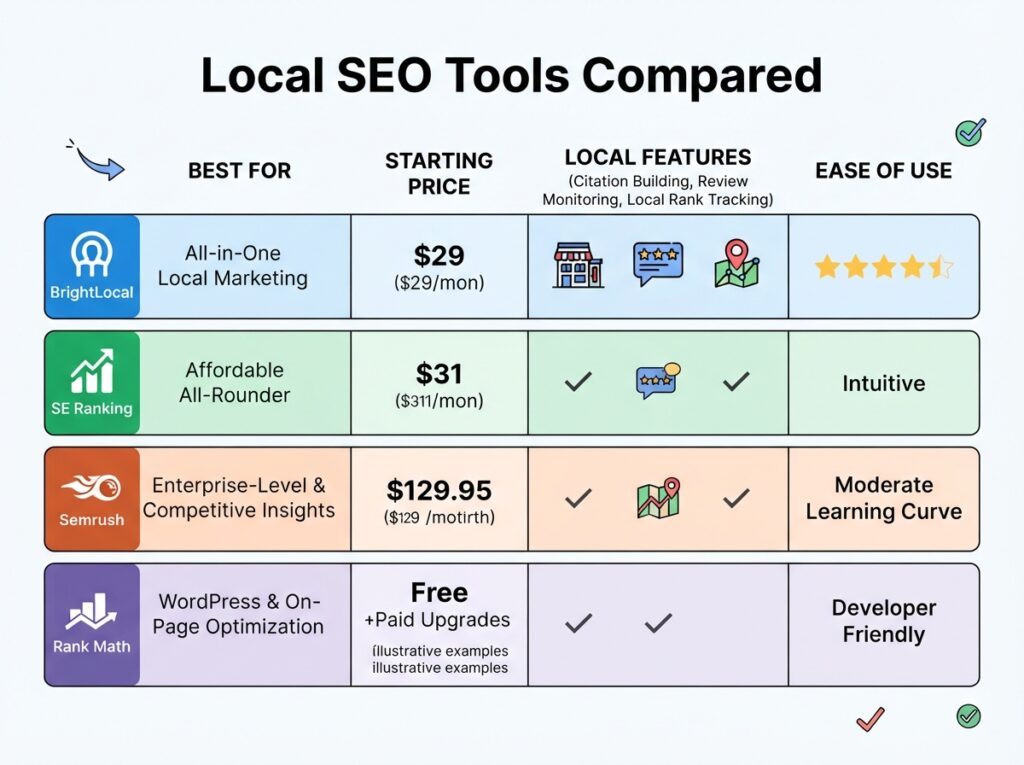
Several AI SEO tools offer specific features for local SEO for small businesses:
BrightLocal ($29/mo): Purpose-built for local SEO with citation building, local rank tracking, review monitoring, and Google Business Profile auditing. The best specialist tool for businesses heavily dependent on local visibility.
SE Ranking ($55/mo): Includes local rank tracking that shows your position for specific keywords in specific locations, plus a local marketing module for citation management and review monitoring. A strong all-in-one choice for local SEO for small businesses.
Semrush ($139.95/mo): Offers listing management, local rank tracking, review management, and competitive local analysis. Best for established businesses that need enterprise-grade local SEO tools alongside general SEO features.
Rank Math PRO ($6.99/mo): For WordPress users, provides automated local business schema markup that helps Google understand your location information. The most affordable way to add structured data for local SEO for small businesses.
For complete reviews of these platforms, see our comprehensive AI SEO tools comparison.
Common Local SEO Mistakes Small Businesses Make
Costly mistake: Neglecting your Google Business Profile after initial setup. Profiles that sit untouched for months lose visibility. Active management—weekly posts, new photos, review responses—signals to Google that your business is open, engaged, and deserving of higher local rankings.
Other common mistakes include inconsistent NAP information across the web (even small variations hurt rankings), creating thin doorway pages for every city you serve instead of substantial location-specific content, ignoring negative reviews instead of responding to them professionally, buying fake reviews (Google detects these and may suspend your profile), not using local schema markup on your website, and targeting keywords that are too broad instead of location-specific terms. Our SEO mistakes guide covers these and other errors in detail, with specific fixes for each.
Final Verdict: Your Local SEO Action Plan
Local SEO for small businesses isn’t a one-time project—it’s an ongoing practice. But the steps in this guide create a flywheel effect: better optimization leads to higher rankings, which leads to more customers, which leads to more reviews, which further improves your rankings. Here’s your prioritized 30-day action plan:
Week 1: Foundation
- Claim and completely optimize your Google Business Profile
- Add 20+ high-quality photos
- Verify NAP consistency across all existing online listings
- Install local business schema on your website
Week 2: Keywords and On-Page
- Research 20 local keywords using Google suggestions and Search Console
- Create or optimize your main location page with local on-page SEO
- Update title tags and meta descriptions with location modifiers
- Add an embedded Google Map to your contact page
Week 3: Citations and Reviews
- Submit your business to the top 10 local directories
- Create a review generation process (email/SMS link after service)
- Respond to every existing review on your Google profile
- Set up review monitoring if using a tool like BrightLocal or SE Ranking
Week 4: Content and Links
- Publish one piece of local content (guide, case study, or community story)
- Identify 5 local link building opportunities
- Post on Google Business Profile at least twice this week
- Set up local rank tracking for your target keywords
The most important thing: Start with Google Business Profile. It’s free, it’s the biggest lever in local SEO for small businesses, and every day you wait is a day potential customers find your competitors instead. Optimize it completely this week, then work through the remaining steps in order. Consistency over time produces results that compound.
Ready to build your complete SEO strategy? If you haven’t already, read our guide to the best AI SEO tools for small businesses to find software that supports your local efforts. Learn the fundamentals with our small business SEO guide. And avoid the errors that hurt rankings with our common SEO mistakes guide.
